Нано Банана: бесплатная ИИ альтернатива Photoshop
26 September 2025

Last updated: December, 2025
Users may encounter frustrating access restrictions when trying to reach Nano Banana through Google AI Studio or Gemini services. Regional limitations, connection instability, blocked requests — many issues can disrupt editing sessions.
Proxies provide a practical solution. In this article, we will explore how Astro data gathering platform can solve this problem, and how to use the free version of Nano Banana for business or personal projects without limitations. You can also check out our article (tutorial + video) on how to get free access to Google's Veo 3 from any country, to dive into the world of creating ultra-realistic, professional-grade videos.
What is Nano Banana and what does it do?
Nano Banana (Gemini 2.5 Flash Image) is Google's revolutionary AI image editing model, which has been making waves on social media. It acts as a free alternative to Photoshop, allowing users to edit existing photos with simple text commands.
Gemini 2.5 Flash Image uses Google's advanced AI to deliver professional-quality results for background changes, clothing modifications, and artistic transformations with exceptional precision. Check out this Google’s article on how to use Gemini 2.5 Flash Image and explore the world of image creation.
Using proxies to unlock Google AI Studio and Gemini
In some cases, Google imposes geo-restrictions on its products. Users trying to access Nano Banana, and businesses experimenting with AI-driven workflows may face access issues. The only reliable workaround is to use whitelisted proxies. It’s important to buy residential or mobile proxies to ensure stable connection.
- Buy residential IP from a proxy provider, such as Astro.
- Configure connection with whitelisted proxies for optimal performance.
- Connect to Google AI Studio or Gemini App.
- Enjoy unrestricted Nano Banana image editing capabilities.
Solutions to Nano Banana restrictions
| Common restriction scenario | Astro's solution | Astro's solution |
| Astro's solution | 100+ countries IP ranges | 100+ countries IP ranges |
| Account registration restrictions | Pre-verified residential addresses | Registers from whitelisted IP ranges |
| AI tools detection by corporate firewalls | Whitelisted residential IPs | Shows Google's servers that you're a trusted user |
| Rate limiting during intensive editing | Dynamic IP rotation | Prevents triggering Google's automated usage detection by switching IPs |
| Mobile connection issues | Carrier-grade mobile IPs | Ensures authentic device signatures for stable uploads |
How to gain free access to Nano Banana?
A free Nano Banana AI version is available to developers and enthusiasts through official sources:
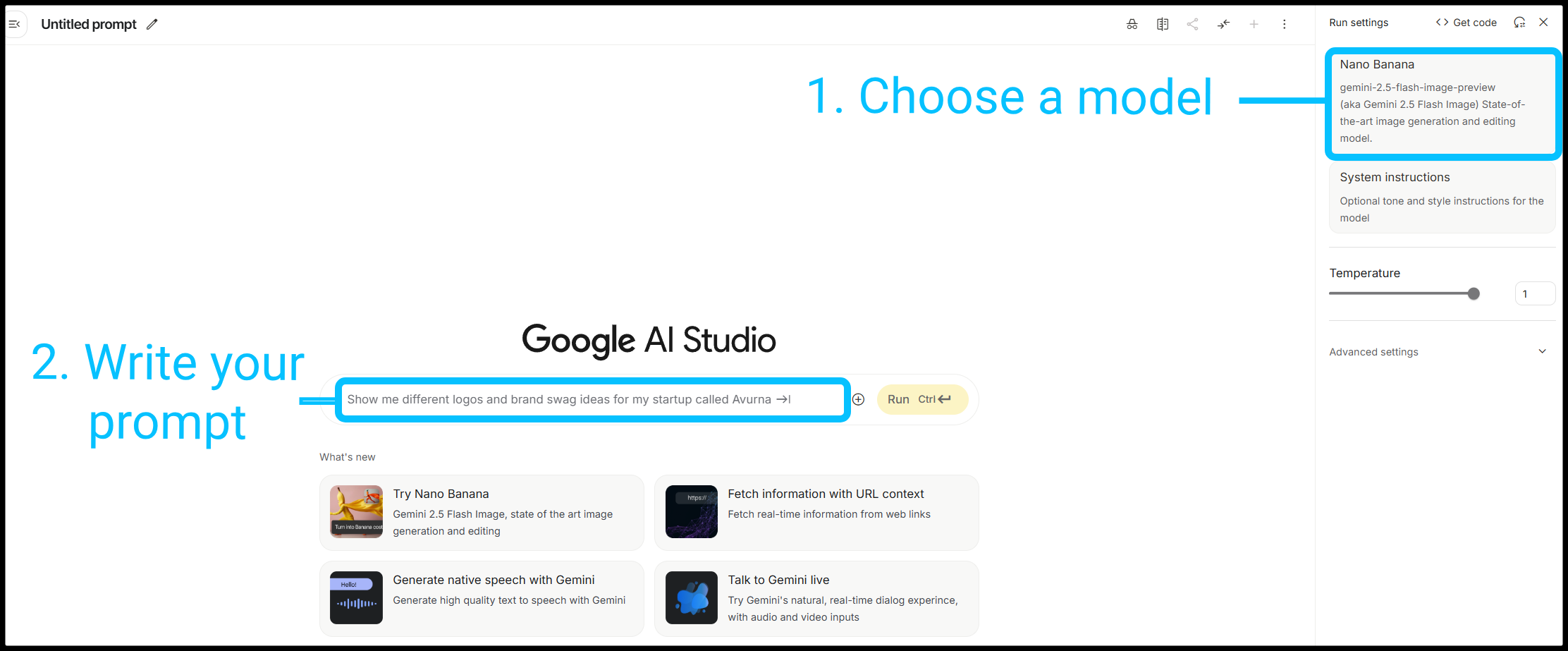
Google AI Studio:
- Sign in to Google AI Studio with your Google account.
- Navigate to Model picker and select Nano Banana.
- Write your prompt and press Enter.
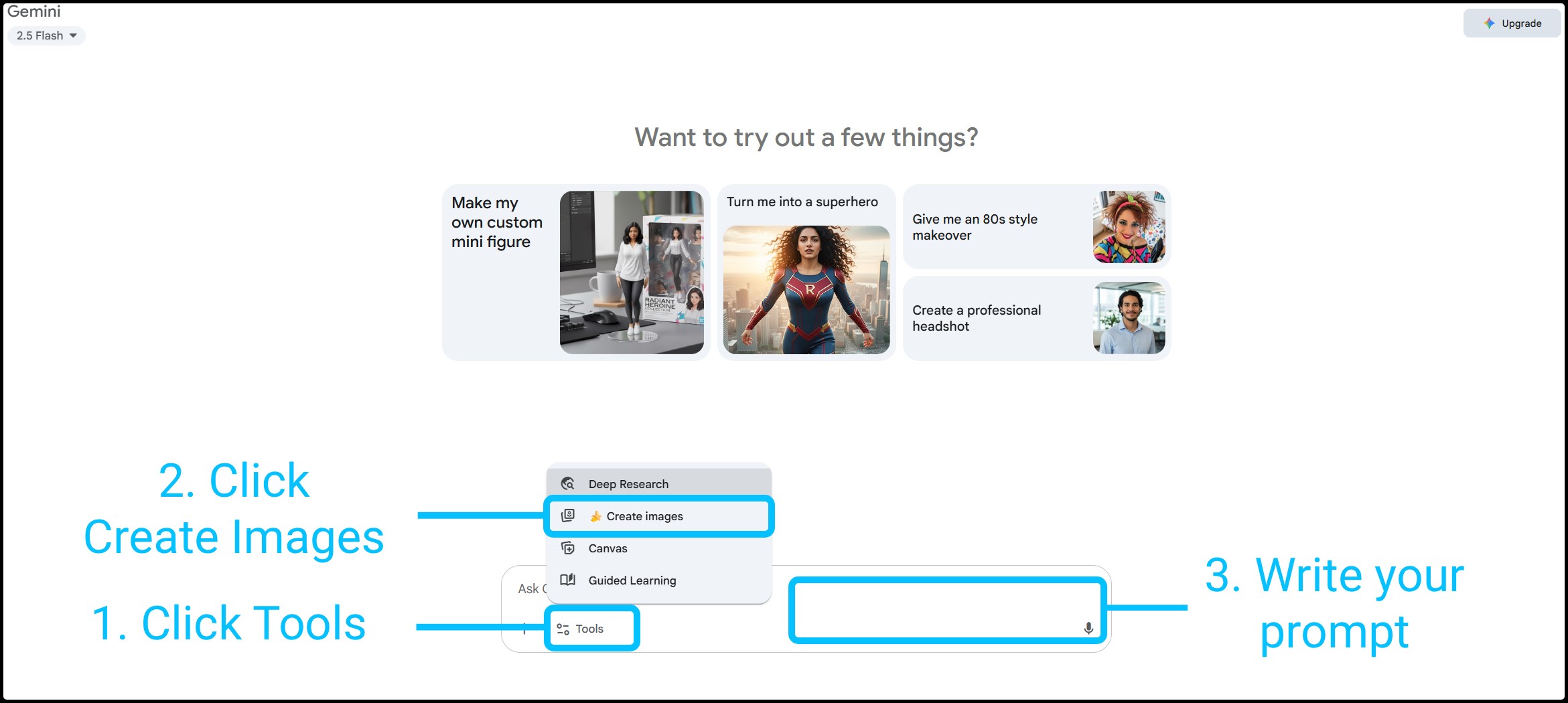
Gemini app:
- Sign in to Gemini App with your Google account.
- Navigate to Tools and select Create Images.
- Write your prompt and press Enter
Some users also access Nano Banana through third-party platforms like Imogen, ImagineArt, or Flux-ai, which may offer alternative features or interfaces.
Why choose Astro's enterprise solutions?
Astro platform delivers premium whitelisted proxies — pre-selected IPs gathered from real users with their consent — to ensure consistent access. Users benefit from precise targeting capabilities, allowing them to choose IP ranges by specific country, city, or ISP for optimal performance.
Global coverage across more than 100 countries ensures Nano Banana access from regions where the service operates freely.
All connections feature dynamic rotation that prevents rate limiting during intensive Nano Banana editing sessions. When Google detects repeated API calls or bulk image processing, automatic IP changes maintain uninterrupted access to your creative workflows. Proxy acts on behalf of the client or the server to mediate communication.
Which proxies to use for Nano Banana?
Residential IP solutions: These authentic home-based connections are geared towards accessing Google services naturally. Buy residential IP addresses for full access to Nano Banana without triggering security systems.
Mobile proxy systems: Ideal for users accessing Gemini through mobile apps. Mobile proxies provide genuine device IPs that blend seamlessly with regular traffic.
High-performance datacenter proxies: When you need speed and reliability for API calls to Google AI Studio, the best datacenter proxies deliver consistent performance with minimal latency.
Buy whitelisted IPs with Nano Banana access, or start with a free trial from Astro for all your image-editing needs.


Вопросы по теме
-
Использование прокси для доступа к Google AI Studio безопасно с технической стороны, так как провайдеры с соблюдением KYC / AML (например, Astro) обеспечивают шифрование трафика и предоставляют реальные этично собранные IP-адреса.
-
Для доступа к сервисам Google ключевое значение имеет страна прокси. Выбирайте регионы, где сервисы Google AI Studio и Gemini полностью доступны: США, Канада, страны Западной Европы (Германия, Великобритания, Нидерланды). Лучше выбирать крупные узловые города (Нью-Йорк, Франкфурт-на-Майне).
-
Да, именно для этого и нужны серверные прокси. Вы настраиваете прокси-сервер как промежуточное звено, через которое ваше приложение или скрипт отправляет запросы к API Google AI Studio.